RECENTLY VIEWED
Skip to main content
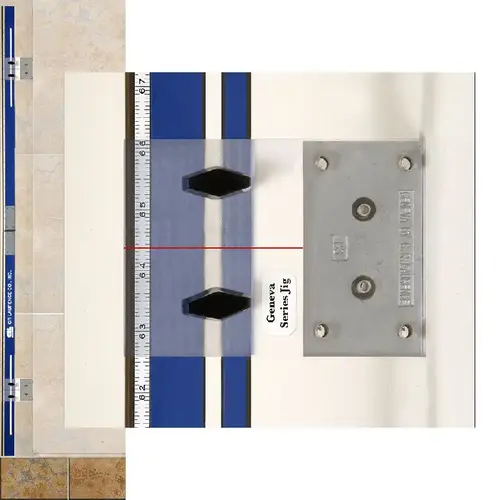
The Frameless Hinge Jig is the latest in a long line of "glazier inspired" tools that makes the installation of a wall mounted door more rapid and increases the accuracy of the hinge placement. The jig has been designed to accommodate many different hinge wall mount plate designs and, in doing so, acts as a template for marking the wall for drilling holes.
The current standard process for putting a frameless shower door into an opening involves mounting the hinges on the door glass, setting the glass into the opening, aligning the door to the right position and marking the wall through the holes in the wall mount plate. The door is then removed and the holes are drilled. At this point, most installers remove the hinges from the door and permanently fasten them to the wall. The Frameless Door Jig eliminates this arduous step and allows the installer to simply place the tool in the opening and mark the wall for drilling. The Frameless Door Jig comes equipped with a folding straight edge that supports two adjustable hinge plates used for marking the wall.
The installation steps are simple: Measure the location of the notches in the door glass. Measure from the bottom of the door glass to the center of the notches and make note of the dimensions. Add the clearance below the door to your dimensions. Select the correct drill jig and place it into the tool. Adjust the sliding jig locator to the correct dimensions previously noted. Stand the jig up in the opening and plumb the tool. Now simply mark the holes on the wall for the appropriate hinge you are using. Drill the holes and mount the hinges to the wall, and hang your door.
DK Hardware Professional Tax Exempt? Net 30? - DK Net Terms
Roll over image to zoom in
Product Features
Product Overview
Related Videos
Reviews
Questions & Answers
See reviewsSee reviews
The item is currently out of stock and it may or may not be restocked
OUT OF STOCK
30 Days Easy Return. We are the largest supplier of the most adaptable, personalized hardware in the industry. We work hard to ensure you're satisfied with our products.
Features
- Accurately Mark Hole Locations Without Mounting Hinges On Glass
- Rapid Mounting of Wall Hinge Plates
- Includes Templates for CRL Geneva, Pinnacle, Cologne and Vienna Hinges
Works with
Geneva, Pinnacle, Cologne, & Vienna Hinges
Product Overview
The Frameless Hinge Jig is the latest in a long line of "glazier inspired" tools that makes the installation of a wall mounted door more rapid and increases the accuracy of the hinge placement. The jig has been designed to accommodate many different hinge wall mount plate designs and, in doing so, acts as a template for marking the wall for drilling holes.
The current standard process for putting a frameless shower door into an opening involves mounting the hinges on the door glass, setting the glass into the opening, aligning the door to the right position and marking the wall through the holes in the wall mount plate. The door is then removed and the holes are drilled. At this point, most installers remove the hinges from the door and permanently fasten them to the wall. The Frameless Door Jig eliminates this arduous step and allows the installer to simply place the tool in the opening and mark the wall for drilling. The Frameless Door Jig comes equipped with a folding straight edge that supports two adjustable hinge plates used for marking the wall.
The installation steps are simple: Measure the location of the notches in the door glass. Measure from the bottom of the door glass to the center of the notches and make note of the dimensions. Add the clearance below the door to your dimensions. Select the correct drill jig and place it into the tool. Adjust the sliding jig locator to the correct dimensions previously noted. Stand the jig up in the opening and plumb the tool. Now simply mark the holes on the wall for the appropriate hinge you are using. Drill the holes and mount the hinges to the wall, and hang your door.
Most shipping weights are approximate and have not been verified. If the exact weight is needed in order to determine shipping costs, and shipping costs are required in order for you to complete your order, please request this prior to submitting your order by contacting CRL Customer Service. Product images shown are of the actual product or a close representation. Colors can vary depending on your computer's video card and on how your monitor's color is adjusted.