DK Hardware 2024-12-09 – 01:22:40
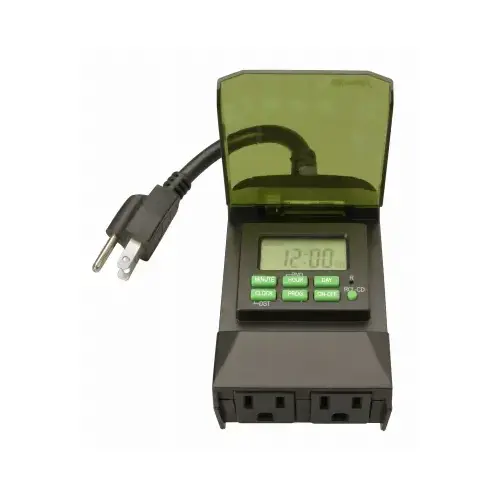
To program the SOUTHWIRE/COLEMAN CABLE 50014WD 7-Day 2-Outlet Outdoor Digital Outlet Timer, follow these steps:
1 - Set the Current Time:
Plug the timer into an outlet and press the CLOCK button.
Use the HOUR and MINUTE buttons to set the current time.
Press the DAY button until the correct day of the week is displayed.
2 - Program the Timer:
Press the PROG button to enter programming mode.
Use the HOUR and MINUTE buttons to set the desired ON time.
Press the DAY button to select the days you want the timer to activate.
Press the PROG button again to set the OFF time and repeat the process for additional settings.
Press the CLOCK button to exit programming mode.
3 - Review Settings:
Press the PROG button to review all programmed settings and make any necessary adjustments.
4 - Connect Devices:
Plug your devices into the timer’s outlets.
Plug the timer into the wall outlet.
5 - Manual Override:
If needed, press the ON/OFF button to manually turn devices on or off.